Finding the best bakery label printer means balancing speed, connectivity, and ease of use. The Brother QL-820NWB stands out as the overall best, offering fast printing and versatile connectivity options. For small businesses or home bakers, the MUNBYN Bluetooth Thermal Label Printer RW403B provides excellent value with wireless convenience. Meanwhile, the Brother PT-M95 is perfect for those just starting out, thanks to its simplicity and affordability. Every option trades off features like print width, speed, or connectivity, so understanding your specific needs is key. Keep reading for a detailed breakdown to find your ideal bakery label printer.

Get baking supplies delivered free with Prime
- Fast, free delivery on millions of items
- Prime Video, Amazon Music and more included
- Member-only deals all year
Key Takeaways
- Wireless connectivity options are a major convenience, especially for small bakeries with limited space or multiple devices.
- Print speed and label size compatibility significantly influence workflow efficiency and flexibility.
- Premium models offer advanced features like dual-color printing and wider formats, but come at a higher cost.
- Ease of setup and user-friendly interfaces matter most for beginners or infrequent users.
- Tradeoffs often involve balancing price, feature set, and print quality—more features usually mean a higher price.



More Details on Our Top Picks
Brother QL-820NWB Professional Monochrome Label Printer with Multiple Connectivity Options
The Brother QL-820NWB stands out for its impressive print speed of up to 110 labels per minute, making it ideal for busy bakery environments that require quick turnaround. Its multiple connectivity options—including Bluetooth, Ethernet, Wi-Fi, and USB—outperform models like the Nelko Bluetooth Printer, which relies solely on Bluetooth or USB, and may involve more setup complexity. The monochrome LCD allows for standalone operation, reducing dependence on a computer. However, it’s limited to label printing only, and its color options are restricted to black and red, unlike more specialized color printers. If speed, flexibility, and standalone use are priorities, this model offers a compelling package. Its main tradeoff is the higher price point and reliance on specific DK labels, which could be a constraint for some users.
Pros:- Exceptional print speed of 110 labels per minute
- Supports multiple connectivity options including Bluetooth, Ethernet, Wi-Fi, and USB
- Standalone operation with a clear LCD screen
- Prints in black and red for versatile labeling
Cons:- Limited to label printing, no color beyond black and red
- Requires specific DK label supplies, which can add cost
- No color printing beyond monochrome red/black
Best for: High-volume bakery operations needing fast, reliable, multi-device connectivity
Not ideal for: Small bakeries or hobbyists who only print occasional labels and prefer simpler setups
- Printer Type:Thermal
- Connectivity:Bluetooth, Ethernet, Wi-Fi, USB
- Print Speed:110 labels per minute
- Maximum Resolution:300 x 300 dpi
- Item Weight:2.5 pounds
- Supported Devices:Laptops, Smartphones, Tablets
Bottom line: This printer is best suited for bakeries that need fast, versatile, and reliable label printing across multiple devices.
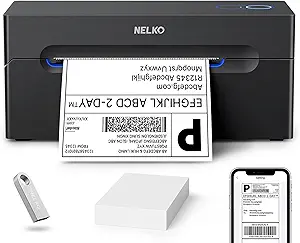
Nelko Bluetooth Thermal Shipping Label Printer, Wireless 4×6 Label Printer for Shipping Packages
The Nelko Bluetooth Thermal Shipping Label Printer offers a budget-friendly, wireless solution for shipping labels, outpacing some competitors like the Brother QL-820NWB in affordability. Its high-speed printing of 150 mm/s ensures quick label production, though it’s limited to thermal labels and only offers a resolution of 203 DPI, which may not satisfy those needing high-detail printing. Its wireless Bluetooth connectivity simplifies mobile printing, but it requires an app for pairing, adding a layer of setup complexity. For small businesses or home bakers printing shipping labels frequently, this model provides an economical, space-saving option. The tradeoff is the limited media type and the need for specific label supplies, which restricts versatility compared to more multifunctional models.
Pros:- Affordable price point with good value
- High-speed printing up to 150 mm/s
- Wireless Bluetooth connectivity for mobile use
- No ink or toner required, reducing ongoing costs
Cons:- Limited to thermal labels, no color printing
- Requires app for Bluetooth pairing, which can be complex
- Limited to thermal media only
Best for: Small bakeries or online sellers needing affordable, fast, wireless shipping labels
Not ideal for: Bakeries requiring color labels or complex design options, or those printing non-thermal labels
- Printing Technology:Thermal Direct
- Resolution:203 DPI
- Print Speed:150 mm/s
- Label Size Range:1.54″ to 4.1″
- Connectivity:Bluetooth, USB
- Supported Platforms:Android, iPhone, Windows, Mac, Chrome OS
Bottom line: Ideal for small-scale bakeries seeking an inexpensive, reliable wireless shipping label printer, with some limitations on media and color options.
Bluetooth Thermal Shipping Label Printer – Portable 4×6 Address Label Printer for Small Business, Compatible with iPhone, Android, Windows, Mac
The KNAON Bluetooth Thermal Shipping Label Printer shines as a portable, flexible choice, supporting both wireless Bluetooth and USB connections. Its speed of 180 mm/s makes it faster than many competitors, like the Nelko, especially for on-the-go labeling tasks. It supports a vast array of templates, labels, and device platforms, including Linux, which broadens its application scope. Its compact size and stylish design make it suitable for small businesses or mobile bakers who need to print labels from multiple devices. The main drawback is the need for the ‘FlashLabel Pro’ app for Bluetooth pairing, which might be confusing for some users, and limited functionality—it’s primarily a print-only device. Still, its portability and speed make it a top pick for dynamic bakery environments.
Pros:- Fast printing speed of 180 mm/s
- Supports a wide range of templates and labels
- Wireless Bluetooth and USB connectivity
- Compact and lightweight for portability
Cons:- Requires app for Bluetooth pairing, adding setup complexity
- Limited to print-only functionality
- Some setup challenges on non-Windows platforms
Best for: Small business owners or bakers who need portable, fast label printing from various devices
Not ideal for: Bakeries that require advanced design features or color printing, or those with limited setup capacity
- Printer Type:Thermal
- Maximum Print Speed:180 mm/s
- Print Resolution:203 dpi
- Print Size:4×6 inches
- Connectivity:Bluetooth, USB
- Supported Platforms:iOS, Android, Windows, Mac, Linux
Bottom line: This printer best serves mobile or small-scale bakers needing fast, portable label printing with broad device compatibility.
Brother P-touch PT-D610BT Business Professional Connected Label Maker with Bluetooth
The Brother PT-D610BT is tailored for bakery owners who need highly customizable labels, offering extensive design options with over 17 fonts, 17 styles, and 900 symbols. Its color LCD display provides clear previews, and the large template library simplifies creating labels for packaging, branding, or organizational needs. Compared to simpler models like the Brother QL-820NWB, the PT-D610BT’s emphasis on customization and its built-in memory for storing up to 90 labels make it more suited for ongoing, branded labeling tasks. It’s less ideal for casual or low-volume use due to its complexity and higher price. For those who want creative control and detailed labels, this model offers powerful features, but it may be overkill for basic bakery labels.
Pros:- Wide variety of fonts, styles, and symbols for customization
- Large color LCD preview screen
- Supports a library of preloaded templates
- Bluetooth and USB connectivity for flexible printing
Cons:- Relatively high cost
- Complex setup for casual users
- Requires compatible devices for Bluetooth printing
Best for: Bakeries that prioritize branded, highly customized labels and have a need for detailed design options
Not ideal for: Casual or hobbyist bakers who need simple, quick labels without extensive design features
- Connectivity:Bluetooth, USB
- Fonts:17
- Styles:17
- Frames:160
- Symbols:900
- Display:20-character, 2-line color LCD
Bottom line: Best suited for bakeries seeking professional, branded, and highly customizable labels with advanced design options.
Bluetooth Thermal Shipping Label Printer – Wireless 4×6 Label Maker for Small Business
The B0DX6RVJF7 Bluetooth Thermal Shipping Label Printer offers a cost-effective, versatile solution for printing a variety of shipping labels, including 4×6 sizes. While its print speed of 72 labels per minute is slower than some, it compensates with support for labels from 1.57″ to 4.3″ wide, making it adaptable for different shipping needs. Its wireless capability simplifies on-demand printing from multiple devices, but the lack of color and the need for USB connections on some platforms limit its flexibility. Compared with the Brother QL-820NWB, this model emphasizes affordability and size flexibility over speed and advanced features. It’s ideal for small businesses that prioritize a broad label size range and straightforward operation, but it falls short if color or high-speed output is required.
Pros:- Supports a wide range of label sizes
- Affordable and versatile
- Wireless printing from multiple devices
- Waterproof labels add durability
Cons:- Limited to black and white printing
- USB required for some device connections
- Slower speed compared to high-end models
Best for: Small business owners needing flexible, budget-friendly shipping labels with wireless capabilities
Not ideal for: Bakeries that require color labels, high-speed production, or complex design features
- Printer Type:Thermal
- Maximum Print Resolution:203 dpi
- Print Speed:72 labels per minute
- Supported Label Sizes:1.57″ to 4.3″
- Connectivity:USB, Bluetooth
- Supported Platforms:iPhone, Android, Windows, Mac
Bottom line: This printer is excellent for small businesses that need adaptable, budget-friendly shipping labels with wireless convenience.
Westinghouse Thermal Shipping Label Printer USB, 4×6 Label, Commercial Grade, Compatible with USPS, UPS, FedEx, Shopify, Amazon, Small Business
This Westinghouse thermal printer stands out for its high-speed output of 6 inches per second, making it ideal for busy shipping environments. Unlike the Brother QL-800, which excels in high-throughput tasks with dual-color options, the Westinghouse focuses on reliability and broad OS compatibility, supporting Windows, macOS, and Linux. Its straightforward design favors straightforward thermal printing without ink or toner, but it lacks Bluetooth, limiting wireless flexibility. The Ethernet option adds network capability, though cables are sold separately, which could be inconvenient for some users. Overall, this model is perfect for small businesses that prioritize speed and multi-platform support over wireless convenience or color printing.
Pros:- High-speed printing at 6 inches per second ensures quick turnaround
- Supports multiple OS including Windows, macOS, and Linux
- Reliable direct thermal printing eliminates ink and toner costs
- Compatible with various label sizes and media types
Cons:- No Bluetooth connectivity limits wireless options
- Ethernet and USB-C cables are sold separately, adding extra cost
- Driver installation can be complex for some users
Best for: Small business owners needing fast, reliable shipping labels across multiple operating systems
Not ideal for: Home crafters or occasional users who don’t require high-volume printing or network features
- Printer Type:Thermal
- Connectivity:USB, Ethernet
- Print Speed:6 inches per second
- Print Resolution:203 DPI
- Media Width:0.78″ to 4.6″
- Maximum Print Width:4.25″
- Media Thickness:0.06mm to 0.25mm
- Label Roll Outer Diameter:4.75″
- Compatible OS:Windows, macOS, Linux
Bottom line: This printer is an excellent choice for small businesses seeking dependable, high-volume shipping label printing with broad OS compatibility.
MUNBYN Bluetooth Thermal Label Printer RW403B, Wireless 4×6 Shipping Label Printer for Small Business, Compatible with Android, iPhone, Windows, Mac, Chromebook, Print Width 1.57-4.25 inches
The MUNBYN RW403B shines with its effortless Bluetooth setup, which requires no downloads—making it more accessible than the Brother PT-M95 for those who prefer wireless operation. Compared with the Brother PT-M95, which is portable and best suited for office or home organization, the RW403B offers broader device compatibility, including Android, iOS, Windows, and Mac, plus a robust lifespan of nearly one million labels. Its quiet operation is an advantage in shared environments, though it’s limited to monochrome printing, unlike the dual-color Brother QL-800. It’s a great fit for small businesses that value convenience, mobility, and customization, but less ideal if color labels or duplex printing are needed.
Pros:- Simple Bluetooth setup with no app downloads required
- High durability with a lifespan of up to 970,000 labels
- Quiet operation suitable for shared or quiet spaces
- Compatible with a wide range of devices and platforms
Cons:- Limited to monochrome printing, no color options
- Requires a compatible app for design customization
- No duplex printing capability
Best for: Small business owners or home users seeking easy wireless setup with extensive device compatibility
Not ideal for: Businesses requiring color labels or duplex double-sided printing
- Printer Type:Thermal
- Output Type:Monochrome
- Weight:3.3 Pounds
- Dimensions:4.9″D x 9.67″W x 6.49″H
- Controller Type:Android, iOS
- Maximum Media Size:4 x 6 inches
- Maximum Sheet Capacity:500
- Print Media:Thermal Paper
Bottom line: This wireless model is ideal for users prioritizing ease of setup and device versatility over color printing options.
Brother QL-800 High-Speed Professional Thermal Label Printer with Dual-Color Printing
The Brother QL-800 excels in environments where speed and visual impact matter most, printing up to 93 labels per minute at 300 dpi. Its dual-color capability—black and red—allows for attention-grabbing labels, a feature not offered by the other models like the MUNBYN 130B. This makes it particularly suitable for shipping labels that need to stand out or organizational labels requiring color coding. However, its reliance on Brother DK labels and the absence of wireless connectivity may limit flexibility for some users. Overkill for occasional labeling, this model best serves high-volume operations that benefit from rapid, colorful output and continuous tape support.
Pros:- Very high print speed of 93 labels per minute
- Dual-color printing for eye-catching labels
- Supports continuous tapes up to 3 feet long
- Seamless integration with Windows and Mac
Cons:- Requires genuine Brother DK labels for best results
- Limited to thermal printing technology—no ink or toner
- Overpowered for low-volume or casual labeling needs
Best for: High-volume shipping and organizational environments demanding fast, dual-color labels
Not ideal for: Small home offices or infrequent label users who don’t need rapid output or color labels
- Print Speed:93 labels per minute
- Resolution:300 dpi
- Color Printing:Dual-color (black and red)
- Connectivity:USB
- Supported Tape Length:Up to 3 feet
- Supported Labels:Brother DK pre-sized labels, continuous-length tapes
Bottom line: This printer is best suited for busy offices or warehouses that need quick, colorful labels at high volumes.
Brother PT-M95 P-Touch Monochrome Label Maker Bundle (4 Label Tapes Included), White
The Brother PT-M95 offers a compact, user-friendly solution for home or office organization, with a QWERTY keyboard and customizable labels. It’s a clear choice for those who prefer manual control and simple design options, especially compared to more complex printers like the MUNBYN 130B. While it’s limited to non-laminated black-on-white tape, its portability and ease of use make it ideal for quick, on-the-go labeling tasks. Heavy-duty or industrial users should look elsewhere, as this device is better suited for light, occasional labeling rather than frequent, high-volume tasks.
Pros:- Portable and lightweight for easy use anywhere
- Multiple fonts, frames, and symbols for customization
- Includes several tape options for versatile labeling
- Simple QWERTY keyboard and clear display facilitate quick editing
Cons:- Limited to non-laminated tape options
- Only monochrome (black on white) labels available
- Less suitable for heavy-duty or industrial labeling needs
Best for: Individuals or small offices needing portable, customizable labels for everyday organization
Not ideal for: Industrial settings or heavy-duty labeling environments requiring durable, laminated labels
- Product Type:Label Maker
- Display:Easy-view display
- Keyboard:QWERTY
- Fonts:9 fonts
- Frames:10 frames
- Symbols:Over 200 symbols
- Tape Widths:9mm (~3/8 inch), 12mm (~1/2 inch)
- Tape Lengths:13.1 ft (4m), 26.2 ft (8m)
Bottom line: This label maker is perfect for home or small office users seeking a portable, customizable solution for everyday labeling tasks.
MUNBYN Bluetooth Thermal Label Printer 130B, Wireless 4×6 Shipping Label Printer for Small Business and Home Use
The MUNBYN 130B combines fast, ink-free thermal printing with extensive customization options, making it a flexible choice for small businesses and organized households. Its support for over 3,500 graphics, 2,000 templates, and 80+ fonts sets it apart from simpler options like the Westinghouse model, which focuses more on speed and OS compatibility. The USB and Bluetooth connectivity allow for seamless setup across devices, although genuine Munbyn labels are recommended for optimal results. While it offers broad design features, it lacks color printing and duplex options, limiting its use for more visually complex labels. Overall, this printer balances performance with customization, but users should be prepared for a learning curve with design elements.
Pros:- Fast, high-quality thermal printing without ink or toner
- Easy setup via Bluetooth or USB
- Extensive customization options including graphics, templates, and fonts
- Compatible with major shipping carriers and marketplaces
Cons:- Requires genuine Munbyn thermal labels for best performance
- Third-party labels can cause printing issues
- Limited color options may not suit all branding needs
Best for: Small business owners or home users wanting customizable, professional-looking labels without ink or toner
Not ideal for: Users needing color labels or double-sided printing for their labels
- Print Resolution:203 dpi
- Maximum Label Size:4×6 inches
- Supported Label Widths:1.57″ to 4.3″
- Connectivity:Bluetooth, USB
- Compatibility:iOS, Android, Windows, macOS, Chrome
- Design Elements:Over 3,500 graphics, 2,000 templates, 80+ fonts
- Color Options:Pink, Lavender Purple
Bottom line: This model offers a strong balance of customization and speed, ideal for users who want professional-looking labels with minimal fuss.
Brother QL-1110NWB Wide Format Postage and Barcode Thermal Label Printer with Wireless Connectivity
The Brother QL-1110NWB stands out for its ability to print wide labels up to 4 inches, making it ideal for mailing and barcode labels that require larger formats. Compared with smaller, standard-sized label printers like the Phomemo 241BT, this model excels in handling broader labels, though it sacrifices color options for monochrome printing. Its wireless capabilities—Bluetooth, Ethernet, and Wi-Fi—enable seamless integration into busy workflows, especially when managing multiple devices across a network. However, its focus on monochrome output limits customization, and the maximum label length of 9.8 feet could be restrictive for some users. This pick makes the most sense for businesses needing large, networked labels without the complexity of color printing.
Pros:- Prints wide labels up to 4 inches for versatile applications
- Wireless connectivity supports mobile and network printing
- Supports barcode cropping and network management tools
Cons:- Limited to monochrome printing, restricting design options
- Maximum label length of 9.8 feet may be limiting for large batches
- Requires multiple driver installations for full functionality
Best for: Small to medium-sized businesses requiring wide-format, network-compatible mailing or barcode labels
Not ideal for: Home bakers or small startups needing color labels or simple, single-device setup
- Printer Type:Thermal
- Maximum Label Width:4 inches
- Connectivity:Bluetooth, Ethernet, Wi-Fi
- Supported Operating Systems:Windows, Mac OS X, Linux
- Maximum Label Length:9.8 feet
- Maximum Print Resolution:300 x 300 dpi
- Item Weight:3.9 pounds
- Item Dimensions:6.7″D x 8.7″W x 5.9″H
Bottom line: Ideal for professional settings needing large, networked monochrome labels with flexible connectivity.
Phomemo Bluetooth Thermal Label Printer, 241BT 4×6 Wireless Shipping Label Printer for Small Business, Pink
The Phomemo 241BT offers a compact, portable solution for printing shipping labels, standing out for its speed—up to 72 labels per minute—making it a great choice for small businesses with high-volume shipping needs. Unlike the Brother TD-4550DNWB, which provides high-resolution, detailed labels for professional use, the Phomemo focuses on quick, efficient printing at 203 DPI, sufficient for most shipping tasks. Its Bluetooth and USB connectivity provide flexibility, especially for on-the-go printing from mobile devices. The main tradeoff is its monochrome output, which limits design options to black-and-white labels, and its small size may not support larger label formats. This device is perfect for small business owners needing fast, portable label printing without complex setup.
Pros:- Lightweight and portable design for mobile use
- Fast printing speed of up to 72 labels per minute
- Supports multiple platforms including iOS, Android, Windows, and Mac
Cons:- Only monochrome printing limits visual customization
- Color labels require separate media and cannot be printed directly
- Setup involves app or driver installation which may be cumbersome for some
Best for: Small business owners who need fast, portable shipping labels on the go
Not ideal for: Large warehouses or operations requiring high-resolution, detailed barcode labels
- Printer Type:Thermal
- Color:Pink
- Weight:720 grams
- Dimensions:6.3″D x 8.66″W x 4.41″H
- Print Resolution:203 x 203 DPI
- Maximum Print Speed:66 ppm
- Supported Media Width:1 to 4.6 inches
- Connectivity:Bluetooth, USB
Bottom line: Perfect for small-scale businesses prioritizing speed and portability over color or high-resolution labels.
Brother TD-4550DNWB 4-inch Thermal Desktop Barcode and Label Printer
The Brother TD-4550DNWB excels in producing crisp, detailed labels for barcodes, receipts, and tags, thanks to its high 300 dpi resolution and fast speed of 6 inches per second. It surpasses the Phomemo 241BT in resolution and durability, making it suitable for environments where label clarity and durability are crucial. With multiple connectivity options—USB, serial, Ethernet, Wi-Fi, and Bluetooth—it integrates easily into varied workflows, though its setup can be challenging for beginners. Its 4-inch media size is standard but limiting if you need larger labels. This model targets users who require detailed, high-quality labels for high-volume or professional applications, rather than casual or small-scale use.
Pros:- High-quality, crisp printing details for barcodes and labels
- Fast printing speed at 6 inches per second
- Multiple connectivity options for flexible integration
Cons:- Initial setup can be complex for newcomers
- Higher price point reflects its professional-grade features
- Limited to 4-inch media size, restricting larger labels
Best for: Businesses needing high-resolution, high-volume barcode and label printing for detailed labels
Not ideal for: Home bakers or small startups looking for budget-friendly, simple label printers
- Print Resolution:300 dpi
- Print Speed:6 IPS
- Media Size:4 inches
- Connectivity:USB, Serial, Ethernet, Wi-Fi, Bluetooth
- Design:Drop-in spindle-less media loading
- Ideal Use:High-volume barcode labels and detailed tags
Bottom line: Designed for professional or high-volume environments needing detailed, high-quality labels with fast throughput.

How We Picked
I evaluated these bakery label printers based on performance, usability, build quality, and value. Priority was given to printing speed, label size compatibility, and connectivity options — all crucial for busy bakery environments. Ease of setup and maintenance also played a role, especially for users new to label printing. I ranked products by how well they balance these factors, favoring models that excel in real-world bakery scenarios while considering affordability and durability. The goal was to identify options suitable for different levels of use, from hobbyists to small commercial operations.Factors to Consider When Choosing Best Bakery Label Printer
Choosing the right bakery label printer involves understanding several key factors that impact daily operation, long-term value, and ease of use. The right choice depends on your specific needs, available space, and budget. Here are the main considerations to keep in mind when selecting a bakery label printer.Connectivity Options
Wireless options like Bluetooth and Wi-Fi offer flexibility and reduce clutter, making it easier to print from multiple devices without cables. For busy bakeries, reliable connectivity minimizes downtime and streamlines label production. However, wired printers often provide more stable connections and are less prone to interference. Consider your setup and whether you prioritize mobility or stability when choosing between wired and wireless models.
Print Speed and Volume
Fast printing speeds are essential for high-volume bakery operations, where waiting can slow down the workflow. Look for models that can handle large batches efficiently. If your volume is lower, slower printers may suffice, allowing you to save money. Also, consider the maximum label size—wider formats support more detailed or larger labels, but may be more expensive or slower.
Label Compatibility and Size
Ensure the printer supports the label sizes you need, whether for packaging, branding, or allergen info. Some printers excel at standard 4×6 shipping labels, while others accommodate wider formats for barcodes or branding. Picking a model that matches your typical label dimensions prevents the need for frequent reconfiguration or additional equipment.
Ease of Use and Maintenance
For bakery owners without technical backgrounds, a straightforward setup and intuitive interface are worth prioritizing. Features like automatic label alignment, easy-loading mechanisms, and clear instructions can save time. Also, consider the availability of support and replacement parts, especially if you plan to use the printer daily or in a commercial setting.
Cost and Long-Term Value
While budget models are tempting, they may lack durability or speed, leading to higher long-term costs due to repairs or replacements. Premium models come with advanced features and longer-lasting build quality but at a higher upfront price. Balance your budget with your volume needs and future growth plans to select a printer that offers the best return on investment.
Frequently Asked Questions
Can I use a standard office printer for bakery labels?
While it might seem convenient, standard office printers typically lack the specialized label printing capabilities necessary for bakery packaging. They often cannot handle the adhesive labels or specific label sizes required. Dedicated label printers are designed for consistent, high-quality output and label durability, making them a better choice for bakery operations that require professional-looking labels.
What is the ideal print speed for a busy bakery?
For high-volume environments, look for printers with speeds of at least 100mm per second or more. Faster printers reduce wait times during peak periods and improve overall efficiency. Slower models may cause delays during busy hours, so if your bakery handles frequent or large orders, prioritizing speed is wise.
Are wireless label printers reliable for daily use?
Many wireless printers are quite reliable, especially those with stable Bluetooth or Wi-Fi connections. However, they can sometimes experience interference or connectivity issues, especially in busy or cluttered environments. Investing in well-reviewed models with strong connectivity features and a good reputation for stability can mitigate these issues for daily bakery use.
How often do I need to replace label rolls or ink?
This depends on your volume and the label size. Thermal printers, which are common in bakery settings, generally require only the replacement of thermal paper, making maintenance simple and cost-effective. Regularly monitoring roll levels and keeping spare supplies on hand ensures continuous operation without delays.
Is it worth paying extra for dual-color or wide-format printers?
Dual-color printers can add visual appeal to labels, especially for branding or highlighting special products, but they are usually more expensive and complex. Wide-format printers support larger labels, which are useful for detailed branding or barcodes. If your bakery’s labeling needs are basic, these features may not justify the additional cost. For higher-end branding or specialized labels, investing in premium models can be worthwhile.
Conclusion
For most small to medium bakeries, the Brother QL-820NWB offers the best overall mix of speed, connectivity, and ease of use. If you’re on a budget or just starting out, the MUNBYN Bluetooth Thermal Label Printer RW403B delivers solid value with wireless convenience. Those seeking premium features like dual-color printing or wider formats should consider higher-end models like the Brother QL-1110NWB. Beginners or infrequent users will appreciate the simplicity of the Brother PT-M95, while larger operations with high-volume needs might lean toward industrial-grade options. Ultimately, your choice should match your volume, label size needs, and technical comfort level to ensure smooth daily operation.
Halloween Picks
halloween
As an affiliate, we earn on qualifying purchases.